EBL Workbench
Electron-beam lithography from layout to resist profile: draw or import a pattern (GDSII), choose or simulate the point-spread function with a Monte Carlo, expose and correct for proximity effects, then process the sample in Fab Studio — resist, development, lift-off, RIE and crystal-plane KOH etching.
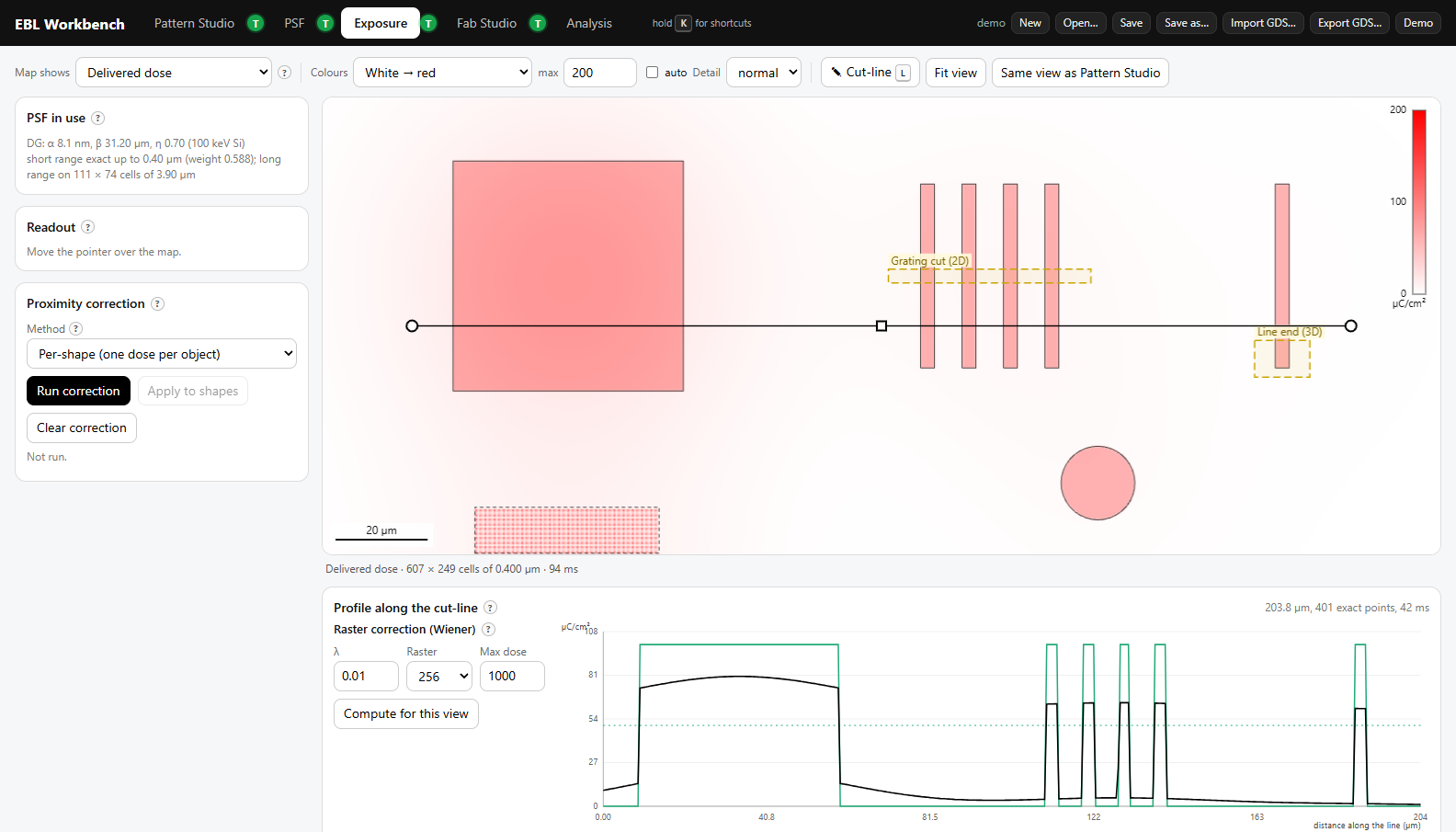
The EBL Workbench follows a pattern through the whole electron-beam lithography process, from the layout you draw to the structure left on the wafer. It shows why a pattern comes out the way it does: the electrons scatter in the resist and the substrate, the dose spreads into neighbouring shapes, and the result depends on how the resist is developed and how the sample is etched. You can change a parameter and see its effect straight away.
The aim is a complete set of tools for teaching and learning, for self-study and experimentation, and for serious pattern design, testing and preparation: checking a layout, finding a dose, correcting for proximity effects and exporting the corrected pattern as GDSII. Modules that prepare write files for some e-beam writers are planned.
The tutorial videos are AI-generated. There is one for each tab, under the T buttons, and they are a quick way to get started. They may contain small mistakes or show an earlier version of a screen, so trust the Workbench itself where the two differ.
EBL Workbench
The whole Workbench in your browser — Chrome, Edge or Firefox, on any computer. Nothing to install; it runs on your machine, and the (AI-generated) tutorial videos stream from this site. For teaching, exercises and the demo patterns.
Open in the browser Download for offline useThe download is the same page as one HTML file, with its tutorial videos (about 280 MB): unzip and double-click EBL Workbench.html.
EBL Workbench PRO
The same Workbench for real e-beam work. Monte Carlo, the proximity-correction solve and KOH etching run in a native multithreaded core on all processor cores, and whole-chip corrections use the computer's memory instead of a browser tab's — a full chip in minutes. Self-contained: unzip and start, nothing to install. Results are the same as in the browser version.
Windows macOS (Apple Silicon) Linux (x64)xattr -dr com.apple.quarantine (with a space at the end), drag the EBL Workbench Pro folder from Finder into the Terminal window, press Enter, and double-click the .command file. The title bar should say PRO · N threads; if it says only PRO, the fast native core is still blocked and the Workbench computes in JavaScript (everything works, but slower) — repeat the command on the whole folder../start-ebl-workbench-pro.sh in the unzipped folder.Which one?
| EBL Workbench | EBL Workbench Pro | |
|---|---|---|
| Runs | in any browser | Windows, macOS (Apple Silicon), Linux (x64) |
| Monte Carlo, correction, KOH | JavaScript, in the page | native core, all processor cores (several times faster) |
| Largest correction | about 2 million control points | whole chips — limited by the computer's memory |
| Use it for | teaching, exercises, demo patterns | real e-beam layouts |
What is in it
- Pattern Studio — draw shapes (rectangles, circles, polygons, and CleWin's regular polygons, ellipses, rings, arcs, crosses and rounded rectangles, all editable by their sizes), arrays and dose ramps; combine shapes with Merge, Subtract, Intersect and XOR; import and export GDSII (with dose tables for corrected files).
- AI assistant — describe a pattern in words (a 10 × 10 array of 2 µm hexagons, each with a 1 µm hole, 1 µm gaps) or a change to the selection (shrink by 10 nm), and see the result on the map before you accept it. The model only writes the operations; the Workbench builds the exact geometry. Uses your own API key for Claude, OpenAI or Mistral (⚙ Settings); the key stays in your browser.
- PSF — double/triple Gaussian and exponential models, or a built-in Monte Carlo of electron scattering in resist and substrate.
- Exposure — delivered dose maps and cut-lines; per-shape, raster and fractured proximity correction.
- Fab Studio — spin, expose, develop, deposit, lift-off, RIE, isotropic and KOH etching on a voxel sample in 2D or 3D; KOH follows the crystal planes of the wafer. A process can also be written in words (PMMA lift-off of 5 nm Cr and 50 nm Au) and is simulated as a new flow.
- Resists — a library of the e-beam resists in the DTU Nanolab cleanroom: contrast curves with their conditions and sources, process advice, and a documented model for other conditions. Every number says whether it is calibrated, inside the process window, or extrapolated. Users can add their own curves and share them.
- Analysis — will it print? Developed widths, dose to size, dose windows and the common process window, and calibration from a dose test.
- JEOL 9500 — a machine-specific module for the JEOL JBX-9500FS at DTU Nanolab: beam current, write time, dose ranks and the job files.
- AI-generated tutorial videos for each tab, under the T buttons, with a "Warnings, common mistakes and pitfalls" video at the top of each list.
About
The EBL Workbench was programmed by Claude Code (Anthropic's AI coding assistant). It is based on a series of visualisation and simulation programs that Peter Bøggild at 2DPHYS, Department of Physics, Technical University of Denmark (DTU), developed over 20 years of teaching electron-beam lithography. Francisca D'Rozario, also at 2DPHYS, contributed the JEOL JBX-9500 module.
The current version is designed to match the machine (the JEOL JBX-9500FS), the processes and the resists available in the DTU Nanolab cleanroom at DTU.
Terms of use
The EBL Workbench is free to use for students and staff at DTU. Users outside DTU must ask for permission first, by writing to Peter Bøggild at pbog@dtu.dk. Questions, bug reports and suggestions are welcome at the same address.
All downloads: release pro-v1.5.